
ProtoArc EK01 Plus Review 2026: Split Ergonomic Keyboard
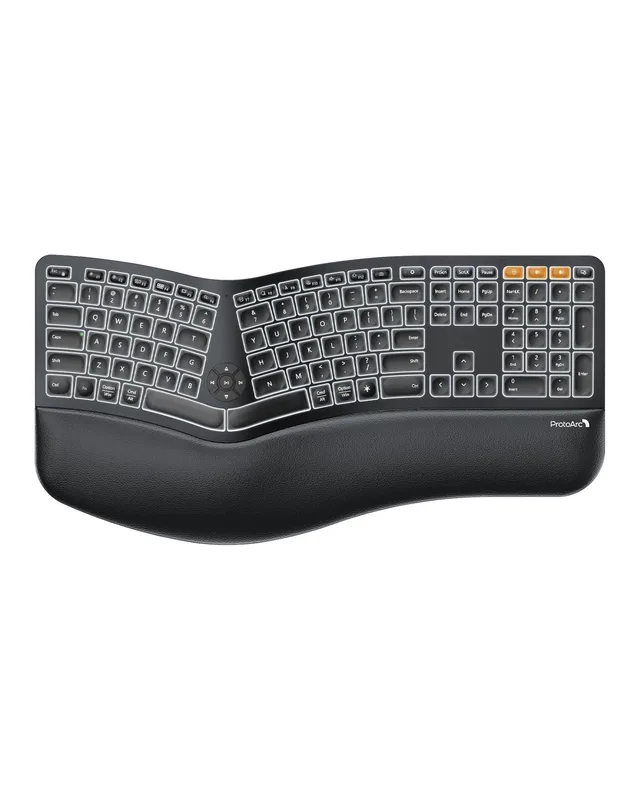
ProtoArc EK01 Plus
Split ergonomic keyboard
↑ Affiliate link — we may earn a commission at no extra cost to you
GFPHOANGNONGVAN at ProtoArc.com checkout. On the $79.99 list price that takes about $8 off. It's our affiliate code, so it also supports RankerNest at no extra cost to you. If ProtoArc is already running a sale, check at checkout whether the code stacks with it.
Table of Contents
What Is the ProtoArc EK01 Plus?
The ProtoArc EK01 Plus is a split, curved-layout keyboard built to let your hands and wrists sit at a more natural angle than a single flat rectangular keyboard forces them into. It's part of ProtoArc's "workspace for wellness" lineup alongside the EC200 chair and EM11 NL mouse — see our full desk setup comparison for how the three address different strain points.
How We Picked This
This isn't a weeks-long typing trial. We picked the EK01 Plus by checking its published mechanism (split, curved key layout) against what actually causes typing-related wrist strain — a flat keyboard forcing your wrists into an unnatural angle for hours at a time — and against its concrete connectivity and battery specs (Bluetooth plus 2.4G USB across three devices, a 2000mAh battery rated around 200 days of standby). We could not find an independent third-party rating platform for ProtoArc, so there's no verified satisfaction score to point to here — see the ratings section below. This is disclosed research, not an in-house multi-week typing test — see how we research products.
Key Features
Split, Curved Key Layout
The actual ergonomic mechanism is the split itself: separating the keyboard into two angled halves lets each hand and wrist sit closer to a natural, shoulder-width position instead of being pulled inward by a single rectangular board. This is the same underlying principle behind every split keyboard on the market, and it's a real, checkable design choice rather than a vague "ergonomic" label.
Three-Level Backlight
Three brightness levels give you a working range for dim rooms or evening typing without a single fixed brightness that's either too dim to see or too bright for a dark room — a small but genuinely useful detail for anyone who works at varied times of day.
Dual Connectivity, Three Devices
Bluetooth plus 2.4G USB connectivity, with the ability to pair up to three devices, means you can realistically switch between a laptop, a tablet, and a desktop without re-pairing each time — useful if your actual workflow spans more than one machine rather than a single dedicated desk setup.
2000mAh Battery, ~200-Day Standby
The rechargeable 2000mAh battery is rated for roughly 200 days of standby by ProtoArc's own specs — worth noting this is a standby figure, not continuous typing time, so actual runtime under regular daily use will be shorter than that headline number.
Real Customer Feedback
We could not find an independent Trustpilot page or similar third-party review platform for ProtoArc, and the EK01 Plus product listing doesn't surface a visible aggregate star rating in its page data as of this writing. That's a real limitation of this page — we can confirm the published mechanism and specs, but not an independently verified satisfaction score across a meaningful sample of buyers.
Pricing & Where to Buy
ProtoArc sells directly through its own Shopify storefront, so there's no marketplace Buy Box to compare against — the price above reflects the listing as of this writing and can change, so confirm it at checkout.
| Product | Price | Notes |
|---|---|---|
| ProtoArc EK01 Plus | $79.99 | Confirm current color/variant on the product page before checking out |
ProtoArc EK01 Plus Pros & Cons
Pros
- Split, curved layout is a genuine, checkable ergonomic mechanism, not just marketing language
- Dual Bluetooth + 2.4G USB connectivity across three devices suits a multi-device workflow
- Three-level backlight covers a useful brightness range for different lighting conditions
- Rechargeable battery avoids ongoing disposable-battery cost
Cons
- No independent third-party rating platform found to verify buyer satisfaction
- Split keyboards typically need a one-to-two-week adjustment period before typing speed returns to normal
- 200-day standby rating is not the same as continuous active-use battery life
Who Should Buy the ProtoArc EK01 Plus?
Anyone whose specific discomfort is wrist or hand strain that builds up over long typing sessions, rather than back pain or mouse-hand strain — the split layout is a mechanism aimed squarely at that one problem. It also fits well if you regularly switch between a laptop, tablet, and desktop, since the three-device pairing removes the friction of re-pairing each time.
The ProtoArc EK01 Plus is NOT right for you if: you need to be at full typing speed immediately — like most split keyboards, expect a real adjustment period before your typing speed catches back up to a flat keyboard.
Other Home & Lifestyle Picks
If this isn't quite the piece you need, here's what else we're currently featuring in ProtoArc's lineup and the wider category:
- ProtoArc EC200 Chair — for back or hip pain from long sitting rather than typing strain
- ProtoArc EM11 NL Mouse — for wrist strain from clicking rather than typing
- ProtoArc XK01 — full-size tri-fold keyboard for typing on the road rather than at a desk
- All Home & Lifestyle Picks — browse the full category
Final Verdict: Is the ProtoArc EK01 Plus Worth It?
The EK01 Plus's case is built on a real ergonomic mechanism (the split, curved layout) and concrete connectivity/battery specs, not a verified review score. If typing-related wrist strain is your specific problem, that mechanism is worth the short adjustment period it typically takes to feel natural — but we can't back this recommendation with independent buyer-satisfaction data, since none was findable.
No independent rating found
Research-based pick, not an in-house hands-on test — see disclosure above.
Check Price on ProtoArc.com →↑ Affiliate link — we may earn a commission at no extra cost to you